Manage Procedures

Procedures Management
The Procedures Management screen allows administrators to define and maintain procedures used within the clinical module. Procedures represent specific clinical tasks or interventions that students may perform, observe, or be evaluated on during their training.
Procedures are organized by Discipline and are used in patient logs, assessments, and reporting to track clinical exposure and experience.
Accessing Procedures
To access the Procedures Management screen:
- From the left-hand navigation menu, expand Clinical
- Select Procedures
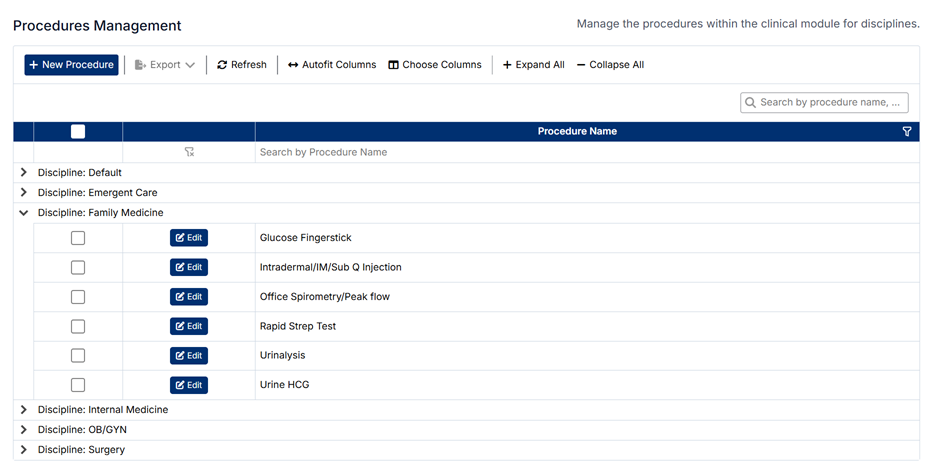
The screen displays a list of disciplines, each of which can be expanded to view the associated procedures.
Understanding the Screen
- Procedures are grouped under their associated Discipline
- Each discipline can be expanded or collapsed using the arrow icon
- Use Expand All or Collapse All to quickly view or hide all procedures
- The search bar allows you to locate specific procedures
- Each procedure can be edited directly within its discipline group
Relationship to Disciplines
Procedures are directly linked to Disciplines, and this relationship determines how they are used throughout the system.
- Procedures are used in student patient logs to record clinical tasks performed or observed
- They may also be referenced in assessments and evaluations
- The selected discipline ensures that only relevant procedures are available within the correct clinical context
This helps maintain accurate tracking of clinical experience by specialty area.
Creating a New Procedure
To create a new procedure:
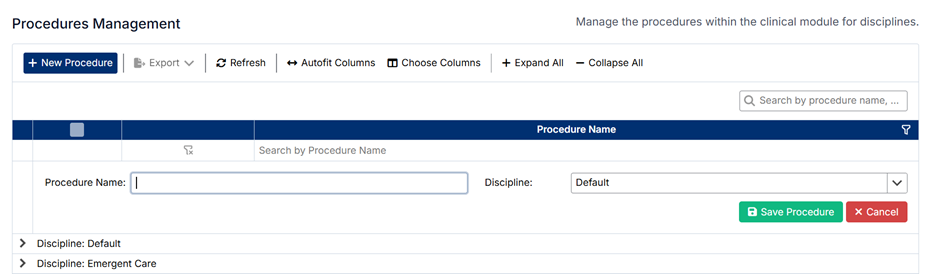
- Click + New Procedure
- Enter the Procedure Name
- Select the appropriate Discipline from the dropdown list
- Click Save Procedure
The new procedure will appear under the selected discipline.
Editing an Existing Procedure
To edit a procedure:
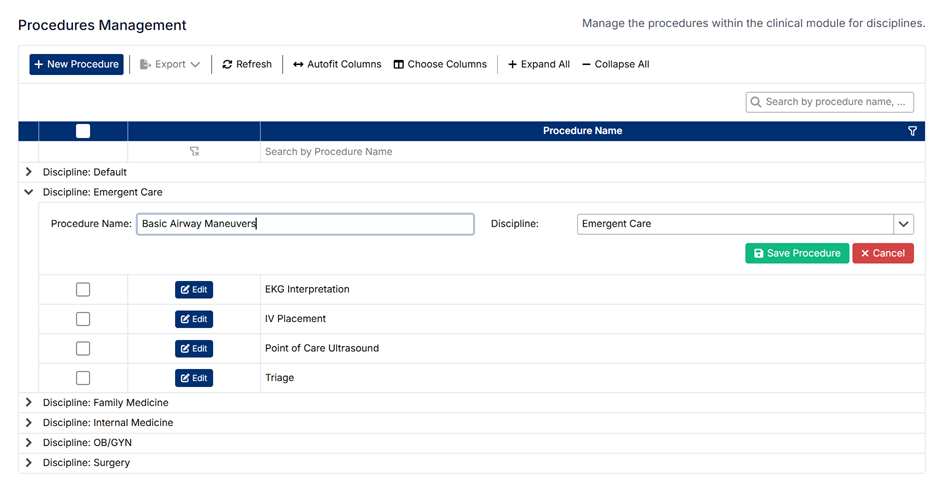
- Expand the relevant Discipline
- Locate the procedure you want to update
- Click Edit
- Update the Procedure Name or change the Discipline if required
- Click Save Procedure
Changes will be applied immediately and reflected wherever the procedure is used.
Deleting Procedures
⚠️ Procedures cannot be deleted.
This restriction ensures data integrity, as procedures may be linked to:
- Existing student patient logs
- Assessments and evaluations
- Historical tracking and reporting data
If a procedure is no longer required, it is recommended to:
- Leave it unused going forward
- Or update its name if appropriate
Important Notes
- Procedures help track the types of clinical tasks students are exposed to during training
- Changes to procedures may affect patient logs, evaluations, and reporting
- Ensure procedure names are clearly defined and linked to the correct discipline
Proper management of procedures supports accurate clinical tracking and consistent reporting across the system.
Created with the Personal Edition of HelpNDoc: Write eBooks for the Kindle